How to Use a SodaStream Terra
Here's how to use SodaStream Terra: fit a pink Quick Connect cylinder, fill a compatible bottle with plain water, attach it, and press slowly. Remove the bottle as directed before adding flavor.
On this page (10 sections)
- How to use SodaStream Terra for the first time
- How do you fill and attach the bottle?
- How do you choose the Terra's fizz level?
- When should you add flavor to Terra sparkling water?
- How do you replace the Terra CO2 cylinder?
- Which spare bottle works with the Terra?
- How do you clean the Terra and its bottles?
- What should you check if the Terra won't carbonate?
- Which Terra kit and supplies should you choose?
- What's the best everyday routine for using SodaStream Terra?
To use a SodaStream Terra, install a pink Quick Connect CO2 cylinder, fill a compatible bottle with plain water, attach it, and press slowly. Remove the bottle as directed before adding flavor.
Learning how to use SodaStream Terra is mostly about keeping that order right. Cold water, the correct fill line, and a secure bottle connection help you get consistent results without unnecessary spills.
The steps below cover your first drink, useful supplies, and everyday care. Keep the SodaStream support instructions nearby for the exact cylinder, bottle-release, and pressing steps for your machine.
How to use SodaStream Terra for the first time
Start by installing the cylinder and washing the bottle, then make your first batch with plain water. Place the machine on a stable, level counter with room to work around it.
Allow space to open the cylinder compartment and fit or remove the bottle. A machine that fits under a cabinet may still need to move forward during setup.
Follow the Terra manual to open the cylinder compartment, position the cylinder, and secure its Quick Connect fitting. Don't twist it as though it were a screw-in cylinder, and don't force a connection that won't close.
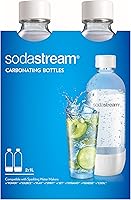
The SodaStream Terra Starter Kit includes 1 Quick Connect 60L cylinder, 1 dishwasher-safe BPA-free bottle, and 1 bubly Lime Drop. It suits a first-time buyer who wants the supplies needed to begin without storing several spare bottles.
Skip this kit if several people need separate bottles from day one. If you're still choosing the machine itself, compare SodaStream machines before buying accessories around one model.
How do you fill and attach the bottle?
Fill a compatible carbonating bottle to its marked water line, then attach it using the Terra's snap-in connection. The bottle's nominal capacity isn't the amount of water you should add before carbonation.
Use cold drinking water for better carbonation. If your tap water has a taste you dislike, chilling it won't remove that taste, so use drinking water you already enjoy.
Leave the headspace shown by the fill line. Filling to the neck reduces room for gas and can push water out during carbonation.
Position the bottle as the manual shows and check that it's secure before pressing. Don't substitute an ordinary drinks bottle, even if its shape looks close.
For help choosing the right format, read our guide to SodaStream bottle sizes and types. Keep a spare filled with plain water in the fridge if you want cold water ready for the next batch.
How do you choose the Terra's fizz level?
Start with one slow press for light fizz, then use a few more for stronger bubbles. Follow the manual for how long to press and how to release and remove the bottle.
Make your first batch without flavor so you can judge the carbonation clearly. Taste it after removal, then adjust your approach on the next batch.
Keep the water temperature and fill level consistent while finding your preferred fizz. Changing both at once makes it harder to tell whether extra presses helped.
How should you use SodaStream Terra for stronger fizz?
Use cold water and a few additional presses, within the machine's instructions. More gas use also means you'll need cylinder exchanges sooner.
Don't keep pressing indefinitely if the water stays flat. Check the cylinder supply and bottle connection before using more gas.
Once you find a routine you like, repeat it rather than chasing a fixed press count. Someone who drinks lightly sparkling water doesn't need the same routine as someone who wants a sharper bite.
When should you add flavor to Terra sparkling water?
Add flavor after carbonation and bottle removal. Keep syrup, juice, citrus, and drops out of the water during the carbonation step.
Pour additions slowly because carbonated water can foam when flavor goes in. Leave space for the flavor, and follow its mixing directions rather than shaking a full bottle hard.
Flavoring a glass instead of the whole bottle works well for shared households. One person can have plain sparkling water while another adds syrup or citrus to the same batch.
Begin with less flavor than you think you'll need, then add more to taste. You can increase the flavor easily, but weakening an overly sweet drink takes more water and space.
Our guide to SodaStream flavors covers ways to vary your drinks. Once a bottle contains flavored water, don't put it back on the Terra for another carbonation cycle.
How do you replace the Terra CO2 cylinder?
Replace a depleted cylinder with a pink Quick Connect cylinder made for Terra. Remove the bottle first, then follow the manual's cylinder-release and installation sequence.
The SodaStream CO2 Refill, 2 Pink Cylinders suits regular users who want a reserve while arranging their next exchange. Skip the extra pack for now if you already have enough full cylinders and a convenient local exchange route.
SodaStream says each cylinder makes up to 60 liters of sparkling water. Stronger carbonation uses more gas, so that maximum isn't a promise of how many batches you'll get.
The pack includes an exchange box and a prepaid return label. Keep the packaging and follow the return and registration instructions when sending empties back.
Read how the SodaStream CO2 exchange works before choosing your refill route. Store cylinders away from heat and don't attempt to open or alter them.
Which spare bottle works with the Terra?
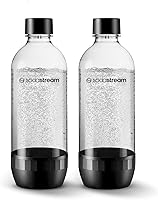
The SodaStream 1L Classic Bottle, Black Twin Pack fits Terra and suits households that want separate drinks or a bottle rotation. Its 2 bottles let you keep plain water chilling while another bottle is in use.
The pair is dishwasher safe and BPA free, with sealing caps designed to help retain carbonation. Cap sparkling water promptly and keep it chilled between servings.
These bottles aren't compatible with Aqua Fizz, Duo, or e-Duo. If you have several SodaStream models, check compatibility before moving bottles between machines.
Skip this pack if your existing bottles already cover your daily use. More bottles also mean more fridge space and more parts to wash.
Check each bottle's printed expiration date and condition before carbonating. Replace an expired, cracked, warped, or otherwise damaged bottle rather than relying on how long you've owned it.
How do you clean the Terra and its bottles?
Wash bottles according to their markings, and wipe the machine with a damp cloth. Keep the machine out of the sink and don't immerse it in water.
The bottles included with these Terra kits and the Classic twin pack are dishwasher safe. Follow their specific dishwasher directions, including any placement or temperature limits.
Rinse after flavored drinks so residue doesn't dry around the neck and cap. Wash caps too, then let the parts dry fully before storing them.
Use mild dish soap and avoid abrasive tools that could damage the bottle. For a fuller routine, follow our guide to cleaning SodaStream bottles.
What should you check if the Terra won't carbonate?
Check water level, bottle attachment, and cylinder supply before trying more presses. A poor connection or low gas supply won't improve just because you keep pressing.
- Water spills: Stop and check the fill line and bottle position before continuing.
- Weak bubbles: Start the next batch with cold water and confirm that the cylinder isn't nearly empty.
- Bottle won't attach: Check compatibility and alignment rather than forcing it.
- Gas keeps escaping: Stop using the machine and follow SodaStream's support steps before making another drink.
The Terra needs the correct connection at both the bottle and cylinder. Our guide to screw-in versus Quick Connect CO2 cylinders explains the cylinder difference.
Don't improvise repairs to pressure fittings. If the normal setup checks don't solve the problem, contact SodaStream support.
Which Terra kit and supplies should you choose?
Choose the Starter Kit for a simple first setup and the Value Bundle for a household that needs more bottles immediately. Both choices center on the same Terra routine, so buy around your storage and drinking habits.
The SodaStream Terra Value Bundle includes 3 dishwasher-safe BPA-free bottles and 2 bubly flavor drops. That makes it useful for people who want separate bottles or several batches ready in the fridge.
Skip the larger bundle if one bottle is enough or your fridge is crowded. Our Terra Value Bundle review can help you decide whether those extra supplies fit your routine.
Buy spare cylinders to prevent interruptions, and spare bottles to improve rotation. They solve different problems, so neither needs to be an automatic extra.
If you want to carbonate drinks other than plain water, compare the best sparkling water makers before committing to Terra.
What's the best everyday routine for using SodaStream Terra?
For daily use, keep plain water cold, carbonate only what you need, and flavor after removal. Cap the finished water promptly and wash flavored bottles before residue dries.
Knowing how to use SodaStream Terra also means planning the next batch. Choose the Starter Kit for one-bottle use, the Value Bundle for shared drinks, and extra gas only when your exchange routine calls for it.
Arrange your next refill before your last full cylinder runs out with our guide to SodaStream CO2 exchange options. Between batches, use our SodaStream bottle cleaning guide to keep bottles ready.
Frequently asked questions
How many times do you press a SodaStream Terra?
Start with one slow press for light fizz, then use a few more for stronger bubbles; keep the water temperature and fill level consistent when comparing batches. Follow the Terra manual for press duration and release steps, and adjust gradually until the carbonation suits your taste.
Do you add flavor before or after carbonating in a SodaStream Terra?
Add flavor after carbonating plain water and removing the bottle from the machine; pour syrup or drops slowly because additions can cause foaming, and leave room for them. Flavoring individual glasses lets people share one batch of sparkling water while choosing different drinks without flavoring the whole bottle.
What CO2 cylinder does the SodaStream Terra use?
The Terra uses a pink Quick Connect CO2 cylinder; choose that connection when buying a spare or arranging an exchange, because a screw-in cylinder isn't interchangeable with it. Follow the machine's instructions to remove the empty cylinder and secure the replacement, and never force a cylinder into position.
Can you carbonate juice in a SodaStream Terra?
Use plain water in the Terra, then add juice or other flavor afterward; carbonating drinks that contain sugar or other ingredients can cause excess foaming and make cleanup harder. If you want to carbonate beverages directly, choose a machine whose instructions specifically allow the drink you plan to use.